Tired of paying exorbitant cable bills for channels you never watch? The world of IPTV offers a flexible, affordable, and feature-rich alternative, and one of the most popular apps to access this world is Nomad IPTV. Downloader Code for Nomad iptv App is 3201918.
A Quick Word for Existing Nomad IPTV Users
If you are a previous Nomad IPTV user looking for a more reliable, buffer-free experience with superior customer support, you’ve come to the right place. Stream IPTV 4K offers seamless compatibility with the Nomad IPTV app. Making the switch is effortless—your existing app will work perfectly with our premium service, giving you access to thousands of HD and 4K channels, Video on Demand (VOD), and an electronic program guide (EPG). All you need are your new Stream IPTV 4K credentials!
How to Install Nomad IPTV on Amazon Firestick / Fire TV
The Firestick is one of the most popular devices for IPTV, and installing Nomad is a straightforward process using the Downloader app.
Prepare Your Firestick: From the home screen, go to Settings > My Fire TV > Developer Options.
If you don’t see “Developer Options,” go to Settings > My Fire TV > About and click on “Fire TV Stick” 7 times until you see a message that you are now a developer.
Inside Developer Options, turn ON “Apps from Unknown Sources.”
Install Downloader: Use the search function at the top of your home screen and look for “Downloader.” Select it and click Download or Get to install it.
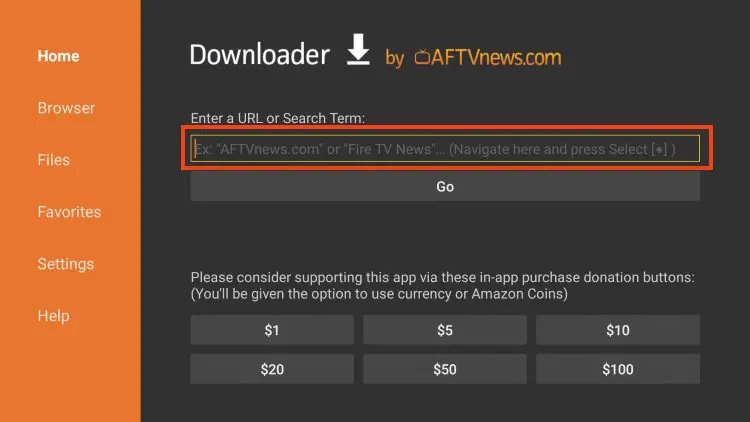
Use the Downloader Code: Open the Downloader app. You will see a field to enter a URL. Simply enter the code: 3201918 and press Go.
Download & Install Nomad IPTV: The Downloader will now fetch the Nomad IPTV APK file. Once it’s loaded, click Install. Wait for the installation to complete.
Open the App: After installation, you can click Open or find the “Nomad IPTV” app in your “Your Apps & Channels” list.
Pro Tip: Once installed, go back into the Downloader settings and clear its cache for security.
How to Install Nomad IPTV on Any Android Device (Phones, Tablets, Boxes)
The process for Android is very similar, as the Nomad IPTV app is an Android application (APK).
Enable Unknown Sources: Go to Settings > Security (or Apps & Notifications on newer devices) and enable Install Unknown Apps or Unknown Sources for your browser or file manager.
Download the APK: Open your device’s web browser and go to the direct download link: nomadiptv app
This will take you directly to the official Nomad IPTV APK download page.
Install the APK: Once the APK file is downloaded, open it. You may get a prompt asking for confirmation. Click Install.
Launch Nomad IPTV: After installation, click Open or find the Nomad IPTV icon in your app drawer.
Getting Started with Stream IPTV 4K on Your Nomad App
Now for the most important part—activating your premium service!
Launch the Nomad IPTV App: Open the app on your device.
Enter Your Stream IPTV 4K Credentials: You will need to enter the following details provided in your welcome email after signing up for Stream IPTV 4K:
Playlist URL: This is the unique M3U URL provided by Stream IPTV 4K.
Username & Password: Your personal login details.
Load Your Playlist: Enter the details and click “Load” or “Login.” The app will now fetch the channel list and EPG data from the Stream IPTV 4K servers.
Enjoy! You are now ready to explore a world of live TV, sports, movies, and series in stunning clarity.
Why Choose Stream IPTV 4K with the Nomad IPTV App?
While the Nomad IPTV app is a powerful tool, the quality of your experience is determined by the IPTV service provider behind it. Stream IPTV 4K is built for performance and reliability.
Massive Content Library: Access thousands of international live TV channels, including premium sports, PPV events, news, and kids’ channels.
Stunning Video Quality: Enjoy true HD, Full HD, and 4K streams where available.
Vast Video on Demand: Never miss a show with our extensive library of movies and TV series.
Electronic Program Guide (EPG): Get full program schedules so you never lose track of your favorite shows.
Multi-Device Support: Use your single subscription on multiple devices.
24/7 Customer Support: We are here to help you get the most out of your service.
Ready to Make the Switch?
If you’re a former Nomad user or a newcomer ready for a top-tier IPTV experience, Stream IPTV 4K is your perfect partner. The Nomad IPTV app is a trusted and efficient player, and when combined with our robust server infrastructure, it creates an unbeatable entertainment solution.
Visit our website today to get started with Stream IPTV 4K and transform the way you watch TV!
Legal Disclaimer: Stream IPTV 4K is a service provider. We do not host or broadcast any content ourselves. The end-user is solely responsible for the media accessed through this service. Please ensure you have the legal right to view the content in your region. All trademarks and logos are the property of their respective owners. This guide is for educational purposes only.
Contains information related to marketing campaigns of the user. These are shared with Google AdWords / Google Ads when the Google Ads and Google Analytics accounts are linked together.
90 days
__utma
ID used to identify users and sessions
2 years after last activity
__utmt
Used to monitor number of Google Analytics server requests
10 minutes
__utmb
Used to distinguish new sessions and visits. This cookie is set when the GA.js javascript library is loaded and there is no existing __utmb cookie. The cookie is updated every time data is sent to the Google Analytics server.
30 minutes after last activity
__utmc
Used only with old Urchin versions of Google Analytics and not with GA.js. Was used to distinguish between new sessions and visits at the end of a session.
End of session (browser)
__utmz
Contains information about the traffic source or campaign that directed user to the website. The cookie is set when the GA.js javascript is loaded and updated when data is sent to the Google Anaytics server
6 months after last activity
__utmv
Contains custom information set by the web developer via the _setCustomVar method in Google Analytics. This cookie is updated every time new data is sent to the Google Analytics server.
2 years after last activity
__utmx
Used to determine whether a user is included in an A / B or Multivariate test.
18 months
_ga
ID used to identify users
2 years
_gali
Used by Google Analytics to determine which links on a page are being clicked
30 seconds
_ga_
ID used to identify users
2 years
_gid
ID used to identify users for 24 hours after last activity
24 hours
_gat
Used to monitor number of Google Analytics server requests when using Google Tag Manager
1 minute
Marketing cookies are used to follow visitors to websites. The intention is to show ads that are relevant and engaging to the individual user.
Google Maps is a web mapping service providing satellite imagery, real-time navigation, and location-based information.



 Written by James