January 16, 2026



 Written by James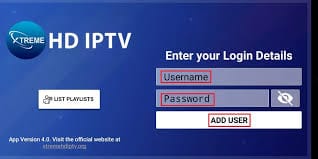
Welcome to XtremeHD! Official Our Partner This guide will walk you through installing the official app on any Android device, including Amazon Fire TV Stick, Android TV Boxes, and phones/tablets, and then setting it up with your subscription.
Our service is optimized and works perfectly with the official XtremeHD app for a seamless viewing experience.
Since the app is not on the Google Play Store, you need to use the Downloader app to install it.
Step 1: Enable Installation from Unknown Sources
Step 2: Install and Use the Downloader App

Step 3: Enter the Downloader Code
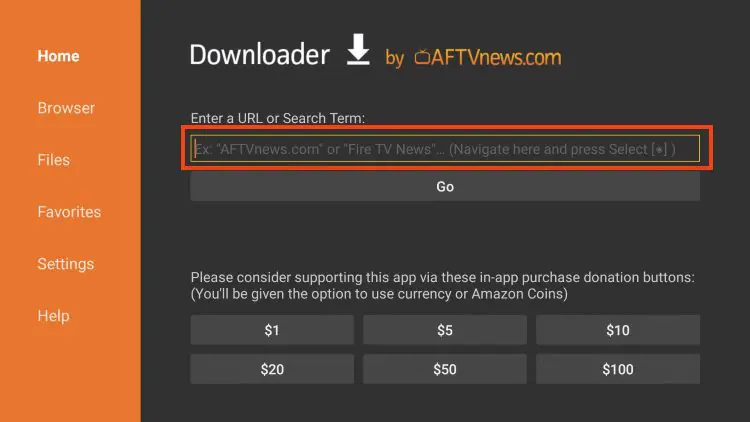
2489513Step 4: Download and Install the XtremeHD App
direct download link).Once the XtremeHD app is installed, follow these simple steps to activate it with your credentials.
Step 1: Launch the XtremeHD App
Step 2: Enter Your Login Credentials
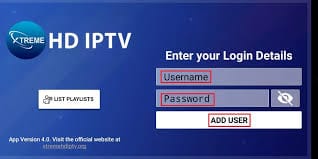
Enter the username provided in your emailEnter the password provided in your emailStep 3: Log In and Start Watching
That’s it! The app will now load your channel playlist and Electronic Program Guide (EPG). You can immediately start enjoying all your live TV channels, movies, and TV shows.
If you have any issues during installation or logging in, please first double-check that your username and password are entered correctly (they are case-sensitive).
If problems persist, please contact our support team with your registered email address for assistance.
Enjoy the ultimate IPTV experience with XtremeHD!
We've provided top-tier IPTV service from day one. Join a community of satisfied streamers.